
Owners
Owner wallets and reconciliation before payout
How to review owner balances, collections, and expenses before issuing statements or transferring payable amounts.
Product Screenshots
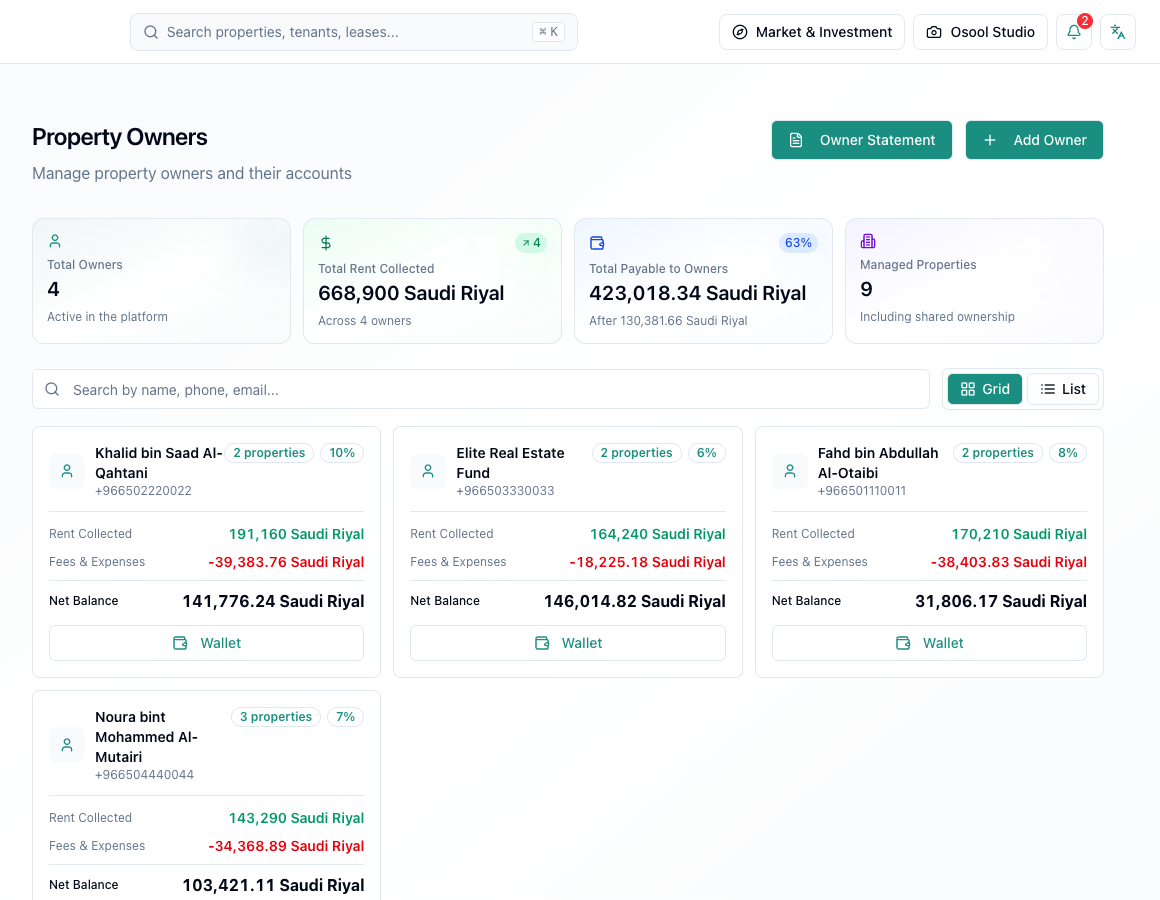
What does the owner wallet mean?
The owner wallet summarizes what was collected for the property, what was deducted as fees or expenses, and what remains payable to the owner. Do not use the number alone without reviewing the transactions behind it.
If the property has multiple owners, review ownership shares before relying on the balance.
Pre-payout checklist
Before any payout, review recorded collections, owner expenses, management fees, partial payments, and manual entries if any.
Print or export the statement when available, then keep the transaction reference according to agency policy.
- Collections
- Expenses
- Management fees
- Partial payments
- Ownership share
- Transfer reference
Common mistakes
Common mistakes include transferring funds before recording a recent expense, assigning an expense to the wrong owner, or missing a unit linked to an old lease.
When there is a discrepancy, do not start by editing the balance directly. Find the transaction that created the difference.
Usage limits
Actual bank transfer and owner approval policy may happen outside the platform or depend on agency integrations. If payout execution is not enabled, treat Osool as the reconciliation source, not the transfer rail.
Owner data that affects this article
Review owner links to properties and units, ownership shares, collections, and expenses before issuing a statement or payout decision.
Any owner wallet discrepancy usually comes from a collection, expense, or ownership link, not from the final balance alone.
- Linked properties
- Ownership share
- Collections
- Expenses
- Statement
How to apply this inside the agency
Turn the article into a small dashboard action: open the related record, review the data, make the appropriate update, then document the outcome so the rest of the team can see it.
If the action involves a financial, regulatory, owner, or tenant-impacting decision, ask the responsible role to review it before final approval.
- Open the record
- Review data
- Take action
- Document outcome
- Escalate when needed
Product status and review needed
This is documented as an available workflow, but results can still vary by user permissions, agency settings, and data quality.
If a step described here is not visible in the agency dashboard, treat it as not enabled for your account and check with your admin or Product.
Related Articles
Owners
Managing owners, wallets, and statements
How to store owner information and follow balances, payouts, and statements.
Read articleAgency Dashboard
Expenses, owner pass-through, and the ledger
How to record property expenses without mixing them with agency income, and when they appear in owner wallets or financial reports.
Read articleAgency Dashboard
Ledger reports and month close
Steps to review collections, expenses, owner balances, and financial reports before closing a monthly period.
Read article